
HTML - HTML5 Semantic Elements
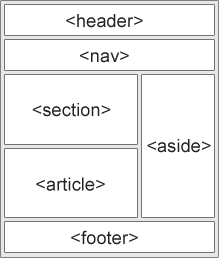
HTML5 semantic elements are tags that clearly describe their meaning to both the browser and the developer. Instead of using generic tags like <div> and <span> everywhere, semantic elements tell what kind of content they contain. This makes websites easier to understand, maintain, and more SEO-friendly.
Before HTML5, developers mostly used <div> for layout, which had no meaning. With semantic elements, the structure of a webpage becomes clear. For example, <header> tells that the content is a header, <footer> indicates the bottom section, and <article> represents independent content. Search engines and screen readers rely on these meanings to better interpret a page.
Important HTML5 Semantic Elements
<header>
Used for introductory content like logos, titles, or navigation links. It usually appears at the top of a page or section.
<nav>
Contains navigation links such as menus or sidebars. It helps search engines identify the main navigation of a website.
<section>
Used to group related content with a common theme. Each section usually has a heading.
<article>
Represents independent content that can stand alone, such as blog posts, news articles, or forum posts.
<aside>
Used for side content related to the main content, like ads, tips, or side notes.
<footer>
Placed at the bottom of a page or section. It contains copyright info, links, author details, or contact info.
<main>
Contains the main content of the page. There should be only one <main> per page.
Why Semantic Elements Are Important
Semantic elements improve readability, SEO, and accessibility. Search engines understand your content better, screen readers help visually impaired users navigate easily, and developers can quickly understand the page structure. In short, semantic HTML makes your code clean, meaningful, and professional.
Simple Example
<header>
  <h1>My Website</h1>
</header>

<nav>
  <a href="#">Home</a>
  <a href="#">About</a>
</nav>

<main>
  <article>
    <h2>Blog Post</h2>
    <p>This is an article.</p>
  </article>
</main>

<footer>
  <p>© 2026 My Website</p>
</footer>

Semantic elements don’t change how a page looks, but they change how it is understood — by browsers, search engines, and humans.