
AJAX - Fetch API with Promises & Async/Await

1. What is the Fetch API?
The Fetch API is the modern way to perform AJAX requests in JavaScript.
It allows a web page to:
-
Request data from a server
-
Send data to a server
-
Do this asynchronously (without reloading the page)
Fetch is a replacement for XMLHttpRequest, with cleaner syntax and better readability.
2. Why Fetch Instead of Old AJAX (XMLHttpRequest)?
Problems with old AJAX:
-
Long, complex code
-
Callback-based (hard to read)
-
Difficult error handling
Fetch solves this by using:
-
Promises
-
Async/Await
3. What is a Promise? (Very Simple Explanation)
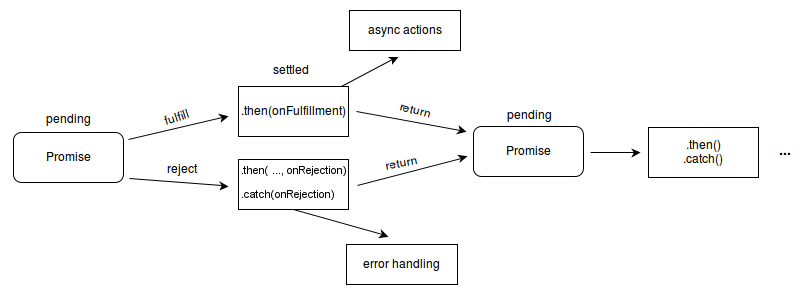
A Promise represents a value that will be available in the future.
A promise can be in one of three states:
-
Pending – waiting
-
Fulfilled – success
-
Rejected – failed
Fetch always returns a Promise.
4. Basic Fetch Syntax (Promise-Based)
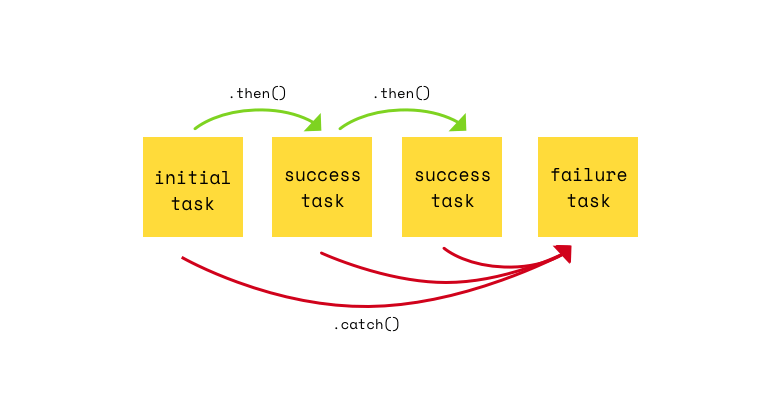
fetch("/api/users")
  .then(response => response.json())
  .then(data => {
    console.log(data);
  })
  .catch(error => {
    console.log("Error:", error);
  });
Flow:
-
Fetch sends request
-
Server responds
-
Response is converted to JSON
-
Data is used
5. Important Point Students Must Remember
❗ Fetch does NOT reject the promise for HTTP errors (404, 500)
It only rejects for network errors.
So always check:
if (!response.ok) {
  throw new Error("HTTP Error");
}
6. What is Async/Await?
async/await is a cleaner way to write promise-based code.
It makes asynchronous code look like normal synchronous code.
-
async→ makes a function asynchronous -
await→ waits for a promise to resolve
7. Fetch Using Async/Await (Recommended Way)
async function getUsers() {
  try {
    const response = await fetch("/api/users");

    if (!response.ok) {
      throw new Error("Server Error");
    }

    const data = await response.json();
    console.log(data);

  } catch (error) {
    console.log("Error:", error.message);
  }
}

getUsers();
✔ Easy to read
✔ Easy to debug
✔ Best practice
8. Sending Data Using Fetch (POST Request)
fetch("/api/users", {
  method: "POST",
  headers: {
    "Content-Type": "application/json"
  },
  body: JSON.stringify({
    name: "Vidhi",
    age: 21
  })
});
Used for:
-
Forms
-
Login
-
Registration
-
Data submission
9. Fetch vs Traditional AJAX (Exam Table)
| Feature | XMLHttpRequest | Fetch API |
|---|---|---|
| Syntax | Complex | Simple |
| Uses Promises | No | Yes |
| Async/Await support | No | Yes |
| Error handling | Difficult | Cleaner |
| Modern support | Legacy | Modern |
10. Common Mistakes Students Make
-
Forgetting
await response.json() -
Not checking
response.ok -
Mixing
.then()withasync/await -
Assuming fetch fails on 404 errors
11. One-Line Exam Definitions
-
Fetch API:
A modern JavaScript API used to make asynchronous HTTP requests using promises.
-
Promise:
An object that represents the eventual completion or failure of an asynchronous operation.
-
Async/Await:
JavaScript keywords that simplify working with promises by making asynchronous code easier to read and write.
12. Why This Topic Is Important for Exams & Projects
-
Core concept in modern AJAX
-
Widely used in real applications
-
Frequently asked in BCA / MCA / interviews
-
Essential for API integration
