
AJAX - Preflight Requests & CORS Negotiation
1. What problem does CORS solve?
Browsers protect users with the Same-Origin Policy.
This means a web page loaded from Origin A (domain + protocol + port) is not allowed to freely access resources from Origin B.
CORS (Cross-Origin Resource Sharing) is a controlled relaxation of this rule.
It allows the server to explicitly say:
“Yes, I trust requests coming from this other origin.”
2. What is a Preflight Request?
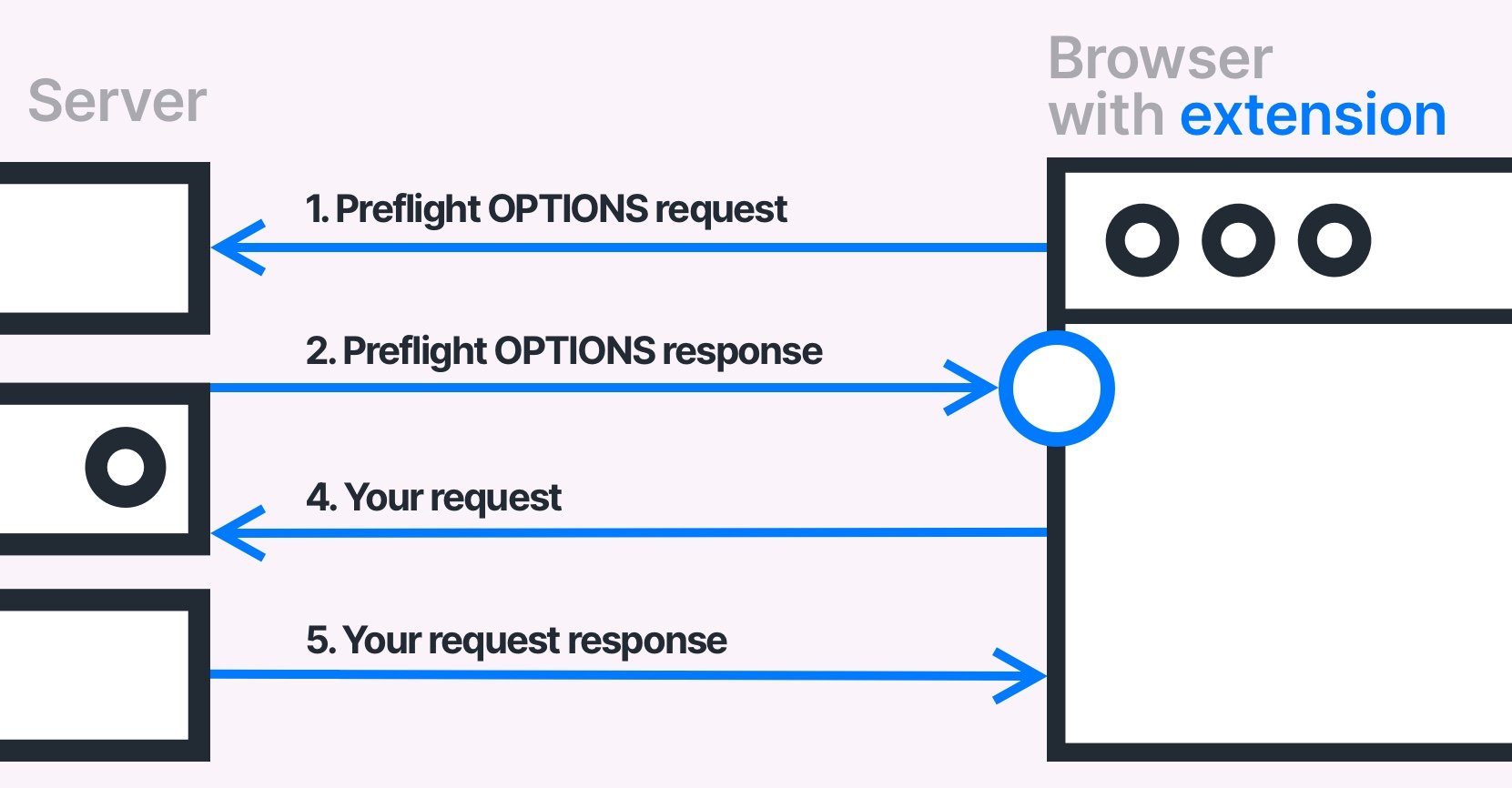
A preflight request is a special permission check sent by the browser before the real AJAX request.
-
It uses the HTTP method
OPTIONS -
It asks the server:
-
Is this origin allowed?
-
Is this HTTP method allowed?
-
Are these headers allowed?
-
Only after approval does the browser send the actual request.
Think of it like security at an office building:
“Before you enter with special equipment, show me your ID and tell me what you’re bringing.”
3. When does a Preflight Request happen?
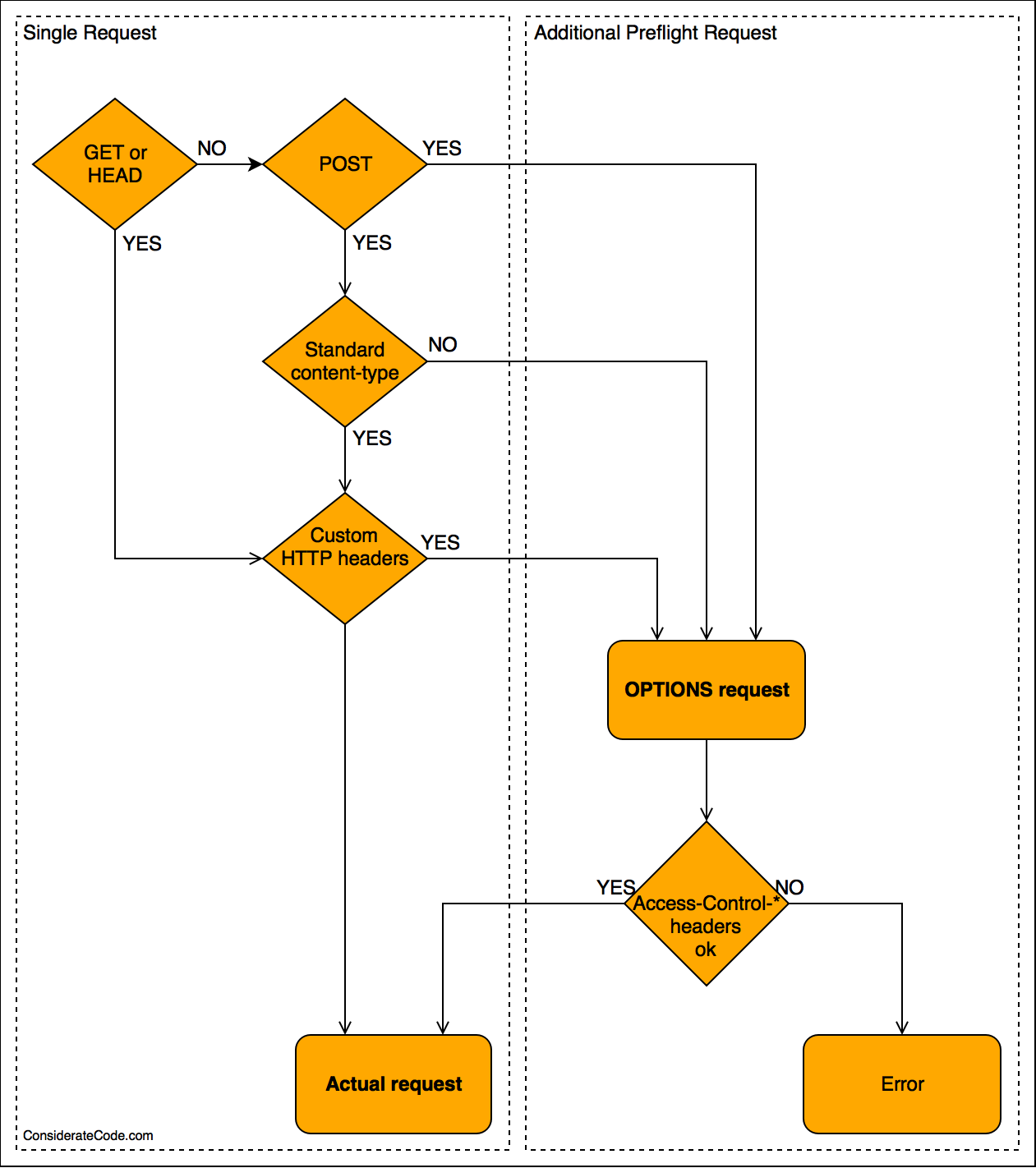
Preflight occurs when the AJAX request is not “simple.”
A request is simple if ALL are true:
-
Method is GET, POST, or HEAD
-
Headers are only:
-
Accept -
Content-Type(onlytext/plain,application/x-www-form-urlencoded,multipart/form-data)
-
-
No credentials like cookies or authorization headers
Preflight is triggered if ANY of these are used:
-
HTTP methods like PUT, DELETE, PATCH
-
Headers like:
-
Authorization -
X-API-KEY -
X-Custom-Header
-
-
Content-Type: application/json -
Sending cookies (
credentials: include)
4. Step-by-Step Flow (Very Important)
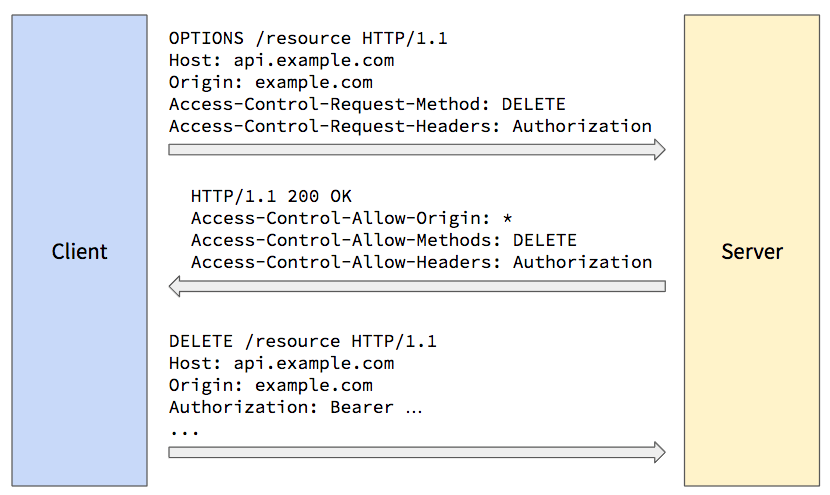
Step 1: Browser sends Preflight (OPTIONS)
OPTIONS /api/user HTTP/1.1
Origin: https://example.com
Access-Control-Request-Method: PUT
Access-Control-Request-Headers: Authorization, Content-Type
This means:
-
“I am from
example.com” -
“I want to use PUT”
-
“I want to send these headers”
Step 2: Server responds with permissions
HTTP/1.1 204 No Content
Access-Control-Allow-Origin: https://example.com
Access-Control-Allow-Methods: GET, POST, PUT
Access-Control-Allow-Headers: Authorization, Content-Type
Access-Control-Max-Age: 600
This means:
-
Origin is allowed
-
PUT is allowed
-
Headers are allowed
-
Cache this permission for 10 minutes
Step 3: Browser sends the actual AJAX request
Only after approval:
PUT /api/user HTTP/1.1
Origin: https://example.com
Authorization: Bearer token
Content-Type: application/json
If preflight fails, this step never happens.
5. Important CORS Headers Explained Simply
| Header | Meaning |
|---|---|
Access-Control-Allow-Origin |
Which websites are allowed |
Access-Control-Allow-Methods |
Allowed HTTP methods |
Access-Control-Allow-Headers |
Allowed custom headers |
Access-Control-Allow-Credentials |
Are cookies allowed |
Access-Control-Max-Age |
Cache preflight response time |
6. What happens if CORS is misconfigured?
Common student mistakes:
❌ Server returns 200 OK, but browser blocks it
❌ API works in Postman, but fails in browser
❌ Error like:
CORS policy: No 'Access-Control-Allow-Origin' header present
Why?
-
Postman ignores CORS
-
Browsers enforce CORS
7. Why browsers do Preflight (Security Reason)
Without preflight:
-
A malicious site could send DELETE / UPDATE requests
-
Could misuse cookies or tokens
-
Could silently modify user data
Preflight ensures:
-
Server explicitly agrees
-
Dangerous actions are not performed silently
8. Is Preflight bad for performance?
Preflight adds one extra request, but:
-
Browsers cache it (
Access-Control-Max-Age) -
Modern apps rely on it for security
-
Avoiding it by bad design is dangerous
Security > minor performance cost
9. One-Line Exam-Friendly Definition
A CORS preflight request is an automatic OPTIONS request sent by the browser to verify whether a cross-origin request with special methods or headers is permitted by the server before sending the actual request.
10. Why this topic is important for students
-
Frequently asked in web technology exams
-
Common interview question
-
Real-world debugging skill
-
Explains why APIs “work locally but fail in browser”
