
HTML - Shadow DOM and Web Components
Web Components are a set of web standards that let you build reusable, self-contained UI components (like custom buttons, cards, modals) using plain HTML, CSS, and JavaScript—no framework required.
They are made of three core parts: Custom Elements, Shadow DOM, and HTML Templates.
1. What Is Shadow DOM?
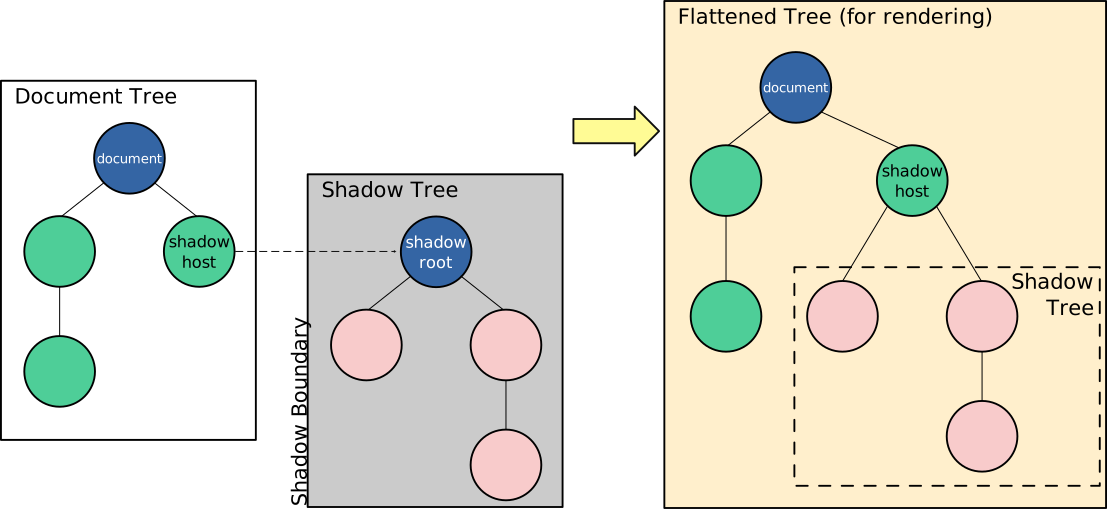
The Shadow DOM is a hidden, isolated DOM tree attached to an element. It encapsulates HTML and CSS, meaning styles inside it do not leak out, and outside styles do not affect it.
Why it matters:
-
Prevents CSS conflicts
-
Makes components predictable
-
Enables true reuse
Light DOM vs Shadow DOM
-
Light DOM → normal page content (affected by global CSS)
-
Shadow DOM → private content (isolated)
2. Simple Shadow DOM Example
<div id="host"></div>

<script>
const host = document.getElementById("host");
const shadow = host.attachShadow({ mode: "open" });

shadow.innerHTML = `
  <style>
    p { color: blue; }
  </style>
  <p>Hello from Shadow DOM</p>
`;
</script>
Even if the page has p { color: red; }, this paragraph stays blue.
3. What Are Web Components?
Web Components allow you to define custom HTML tags with their own logic and styling.
Core Parts:
-
Custom Elements → define new HTML tags
-
Shadow DOM → style & DOM isolation
-
<template>→ reusable markup
4. Custom Element + Shadow DOM Example
<my-card></my-card>

<script>
class MyCard extends HTMLElement {
  constructor() {
    super();
    const shadow = this.attachShadow({ mode: "open" });
    shadow.innerHTML = `
      <style>
        .card { border: 1px solid #ccc; padding: 10px; }
      </style>
      <div class="card">
        <slot></slot>
      </div>
    `;
  }
}

customElements.define("my-card", MyCard);
</script>
Usage:
<my-card>
  <h3>Title</h3>
  <p>Content inside the card</p>
</my-card>
Here:
-
<my-card>is a custom element -
Shadow DOM protects its styles
-
<slot>allows external content inside
5. Open vs Closed Shadow DOM
attachShadow({ mode: "open" })   // Accessible via JS
attachShadow({ mode: "closed" }) // Not accessible
-
Open → easier debugging (recommended)
-
Closed → stricter encapsulation
6. Why Shadow DOM and Web Components Are Important
-
No CSS clashes
-
Framework-independent
-
Reusable UI building blocks
-
Used by modern browsers and design systems
-
Ideal for large, scalable applications
-
Shadow DOM = style + DOM isolation
-
Web Components = reusable custom HTML elements
-
Together, they enable clean, scalable, component-based web development without relying on frameworks
If you understand this, you already understand the foundation of modern UI architecture.
